A significant login update is now available for ALNBS. The authentication method has been updated to align with state requirements, strengthen account security, and modernize the login process for both internal and external users. Below is a quick overview of what has changed and what you can expect with the new login method.
Up until now, ALNBS has required two logins, each having separate user names and passwords. With this upgrade, the first login (the one with the pop-up box) has been removed and replaced with a post-login step (known as multi-factor authentication or MFA).
After you enter your user name and password, ALNBS will ask you to confirm your identity using one of two options: a verification code sent to your email address, or a code generated by an authenticator app (Microsoft Authenticator, Google Authenticator, and similar apps). If you choose the authenticator app option, you are provided with a QR code and secret, and you will complete a quick enrollment the first time you use it.
Even if you plan to use an authenticator app, a valid email address is still required for your ALNBS account. Please be sure you have verified and can access the email address we have on file.
If you have any trouble signing in, please contact the ALNBS support team.
As mentioned in the last AlaNUG meeting, we are requiring that ALNBS users update their account passwords. For over twenty years, passwords in ALNBS have had a minimum length requirement of eight characters. To align with current ADPH policy and strengthen account protection, that minimum has been increased to fourteen characters.
It is worth noting that ALNBS only stores a hash of a user’s password in the database for security, never the actual value. Because of this, it is impossible to know anyone’s actual password and whether it currently meets the new character requirement. As a result, all users will be prompted to update their password as part of this transition.
When selecting a new password, consider using a passphrase or a combination of multiple unrelated words that only you would know. Including a mix of uppercase and lowercase letters, numbers, and symbols adds additional protection. Avoid any details that could be easily guessed or publicly associated with you, such as names, dates, or common phrases. A strong password should be difficult for others or automated tools to predict. A password manager is highly recommended for creating and storing strong, unique passwords.
The Alabama NBS User Group (AlaNUG) held its second meeting on October 22, 2025 with a total of fifty-five attendees. The upcoming multi-factor authentication (MFA) solution was introduced during the meeting. IT is hard at work incorporating MFA into ALNBS to provide better security for the system. It will also allow users to have one set of login credentials instead of two when signing into the system. The user will log in then will receive a code via email or authenticator app. To ensure this process goes smoothly, users will be asked to verify their email addresses and will be prompted to change their passwords in the coming weeks.
The future Legionellosis page was also demoed for AlaNUG participants. This included explaining what a message mapping guide (MMG) is and the process for implementing the guide into the investigation page in ALNBS. A more in-depth presentation on the back-end process for creating an investigation page was recorded for those interested.
The next AlaNUG meeting is scheduled for January 23 at 2 PM CT.
ADPH hosted its inaugural Alabama NBS User Group (AlaNUG) on September 25, 2025. Eighty-two participants joined the meeting from across the state, including many local districts.
The meeting included introductions to your AlaNUG team, a discussion of why participation matters, and the benefits of joining. Members heard a history of ALNBS, current system release updates, the status of message mapping guides for Alabama, and ongoing reporting database issues.
AlaNUG is a positive, collaborative space for users of ALNBS. We will provide updates, training opportunities, and a forum to raise questions and share solutions. By participating, members gain early insights into system changes, build professional connections, and have a voice in shaping modernization efforts for Alabama.
The group will meet monthly on the fourth Thursday at 2 PM CT to keep members informed and engaged.
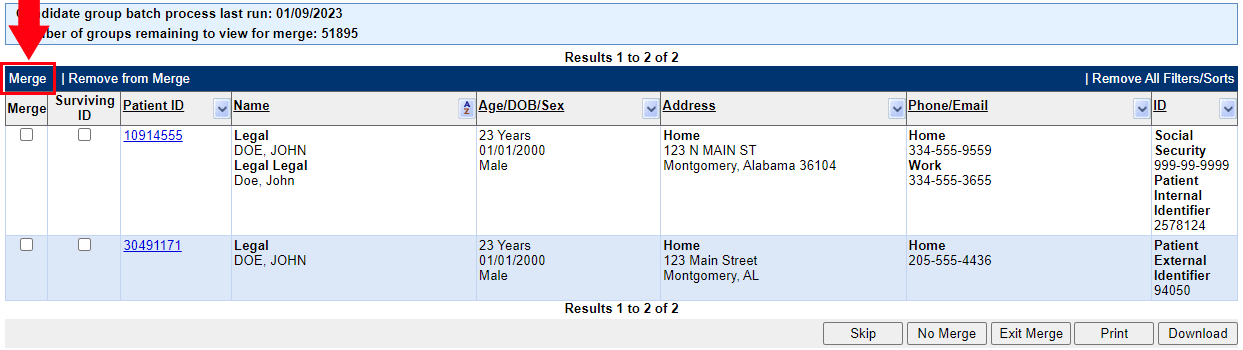
On Friday, NBS 6.0.13 was installed in production. This release includes a revamped Patient Merge screen. The change causing the most confusion is the location of the Merge button. In this version, it is a small link located on the left side just above the column headers. The button will be made much more prominent in the next release (6.0.14), which will be installed in February.